10-1 NexVDO SDK - QDEEP Overview and Architecture
Do you remember the "NexVDO SDK Block Diagram" we first saw in the chapter 9-1 NexVDO SDK - QCAP Feature Overview and Architecture?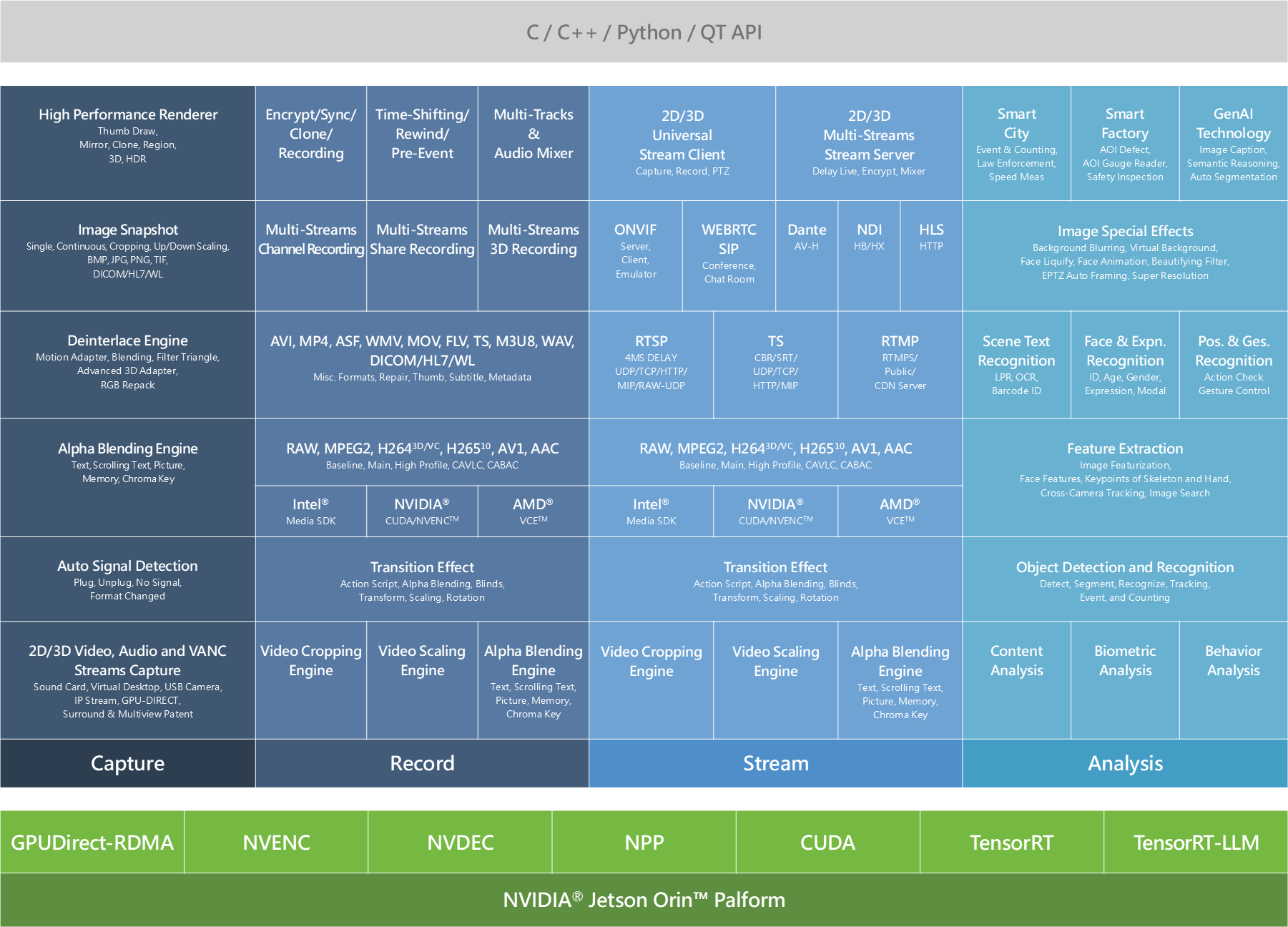
➤ Official Reference Information: If you want a sneak peek at the complete specifications and product details of this SDK, please feel free to visit the YUAN Official Product Page to learn more!
Looking back at our practical exercises over this period, we have successfully conquered the first three major areas of the block diagram, which are handled by QCAP: Capture, Record, and Stream. We learned how to efficiently capture camera footage into the computer, compress them into MP4 files, and even stream them to YouTube to share with the world.
However, in today's technology trends, merely "seeing" and "transmitting" images is no longer enough. To upgrade traditional industries, we need to give computers a "brain," which means equipping software with AI artificial intelligence capable of understanding video content.
Today, we are finally going to unlock the most valuable and final core area of the block diagram—Analysis, and formally introduce you to the AI brain in the NexVDO SDK: the QDEEP Engine!
Analysis
The QDEEP engine of the NexVDO SDK perfectly integrates GPU acceleration technologies from NVIDIA and Intel, significantly enhancing the efficiency of Deep Learning inference. It divides AI analysis features into the following three core modules, covering almost all application scenarios on the market:
Three Basic Analysis Modules
This module aims to enable computers to "understand" specific objects and events in the video frame.
1. Content Analysis: Enables the computer to understand the context within the frame.
• Object Detection and Recognition: Covers detection, segmentation, recognition, tracking, counting, up to final event triggering.
• Scene Text Recognition: Supports license plate recognition (LPR), OCR, and barcode recognition, quickly digitizing key information in the frame.
2. Biometric Analysis: Deeply analyzes human feature information.
• Feature Extraction: Featurizes images, accurately capturing facial landmarks, human skeleton keypoints, and hand joints, and even supports cross-camera tracking and image/audio matching search.
• Face & Expression Recognition: Not only supports identity recognition but also quantifies the subject's attention, age, gender, and expression.
3. Behavior Analysis: Advanced applications for continuous dynamic video.
• Posture and Gesture Recognition: Can be used for action standard checking and intuitive gesture control.
AI Image Special Effects Processing
This is a highlight module that perfectly combines AI with traditional audio and video. With the assistance of neural networks, QDEEP can achieve broadcast and video conference-grade image special effects processing, including:
• Background Blurring and Virtual Background ( Background Removal )
• EPTZ Auto Framing ( keeping the camera always focused on the subject )
• Human Transparency ( For example, in distance learning or course recording, when a lecturer stands in front of a blackboard writing, AI can instantly recognize and make the lecturer's body transparent. In this way, the audience's view is not obstructed at all, allowing them to clearly see the complete handwriting on the board without blind spots. )
Top-Level Vertical Applications and Next-Generation Technology
At the very top of the architecture diagram, the QDEEP engine perfectly crosses the boundaries of traditional pure vision. It integrates the most advanced Generative AI and Large Language Models to elevate underlying data into three major engines with "logical thinking and conversational abilities":
• Smart Audio Engine: Allows the system not only to "see" but also to "listen" and "speak." It supports multi-language real-time subtitle generation and can convey system messages to users through realistic voice broadcasting. Even more powerfully, it allows developers to create voice-command-driven software interfaces, enabling users to control the system directly with voice.
• Smart Video Reasoning: Endows computers with true "logical thinking" capabilities. It can understand complex visual contexts and provide real-scene danger warnings; faced with dozens of hours of surveillance video footage, it can quickly perform long-video event analysis. More amazingly, it supports natural language image search—you only need to input "find a man wearing red clothes and a hat," and the system can automatically understand the semantics and accurately retrieve the target frame from a vast amount of video!
• Smart Conversational Agent: It possesses a powerful automated content summarization ability, capable of understanding video and data to generate reports automatically. It also features a built-in 24-hour Q&A customer service and multi-language real-time translation, making it perfectly suited for smart unmanned counters.
( Of course, in addition to these three major engines, this layer also includes directly deployable vertical industry solutions such as Smart Traffic and Smart Factory, as well as powerful Generative Technology, providing developers with comprehensive support. )
Are You Ready for Hands-on Practice?
Through the introduction above, we can clearly see that whether it is QCAP or QDEEP, the ultimate goal of the NexVDO SDK is to help developers pave over the messiest and most performance-consuming underlying swamps. From video capture all the way to intelligent analysis, it provides us with an incredible shortcut for acceleration!
As the saying goes, "To do a good job, an artisan needs the best tools." Before we officially summon various powerful AI models (such as detecting human figures, faces, vehicles, or objects), we need a solid "project foundation."
Recalling the architecture diagram we just looked at, all AI video analysis actually follows a standard S.O.P ( Standard Operating Procedure): "Receive Video Stream ➔ Frame Decoding ➔ Send to AI Engine ➔ Draw Bounding Boxes with OpenCV".
➤ Here, we want to particularly explain an important concept: Through the powerful QCAP module of the NexVDO SDK, the ways to acquire "video data" are highly diverse! You can capture footage from physical video capture cards ( HDMI / SDI ), local video files, or network streams. For the sake of teaching convenience and consistency, all our upcoming AI series examples will use "Receiving RTSP Video Stream" as the representative demonstration for the video input source.
To avoid going through the tedious process of pulling UI elements, configuring CMake dependency libraries, and writing network connection codes repeatedly in every future AI function implementation, in the next chapter, Building the Basic Template Project for AI Visual Analysis, we will first guide you to write this "standard process" into a versatile development framework ( QDeepSample ).
This clean template will become your strongest foundation for developing all smart visual applications in the future! Once this foundation is laid, in subsequent chapters, no matter which AI model you want to switch to, you will only need to "replace the model files" and "modify a few lines of core APIs" to instantly endow your program with entirely new visual recognition capabilities.
Open your Qt Creator, are you ready to show your skills? See you in the next chapter!