10-5 Vehicle Detection Function Example Tutorial
In 10-4 Face / Head / Body Detection Function Example Tutorial, we witnessed the powerful modular capabilities of the QDEEP engine, achieving multi-feature ( face, head, body ) recognition simply by replacing the model.
In this chapter, we will shift the application scenario from "indoor surveillance" to "outdoor smart traffic." We will introduce a lightweight model specifically trained for Taiwan traffic scenarios, instantly granting your software the superpower to distinguish between "pedestrians, motorcycles, small cars, and large cars." This is the core technology for technology-assisted law enforcement and traffic flow calculation!
Learning Objectives
Through this chapter, you will learn:
1. Configure and load the dedicated vehicle and pedestrian detection model for smart traffic scenarios.
2. Understand the definition changes of the nClassID returned by the new model.
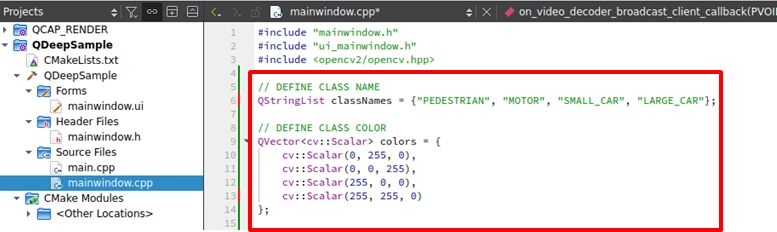
3. Implement and expand the exclusive colors and labels for the four traffic features.
Preparation
To equip the AI with vehicle recognition capabilities, we must change its "brain" to one focused on traffic recognition.
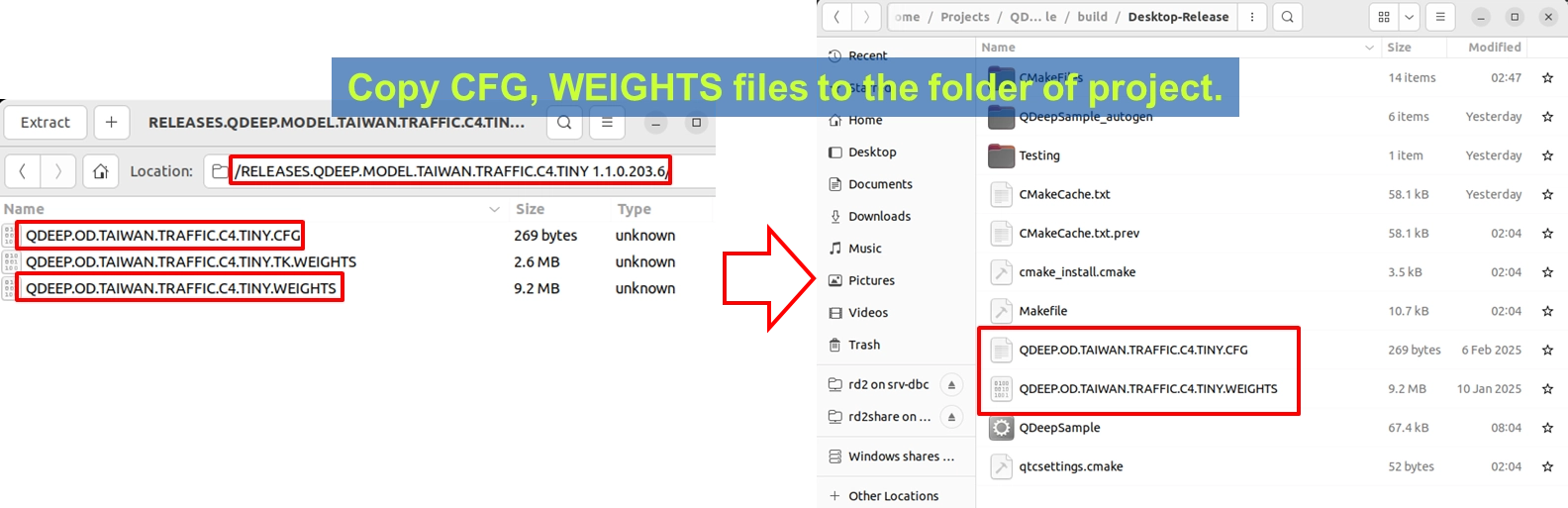
1. Please find the Taiwan Traffic detection model compressed file provided by YUAN ( the file name may indicate TAIWAN.TRAFFIC.C4.TINY related terms ).
2. After extraction, copy out QDEEP.OD.TAIWAN.TRAFFIC.C4.TINY.CFG ( configuration file ) and QDEEP.OD.TAIWAN.TRAFFIC.C4.TINY.WEIGHTS ( weight file ).
3. Paste these two files directly into the build output directory of your current Qt project ( at the same level as the executable file ).
How to Change Core APIs?
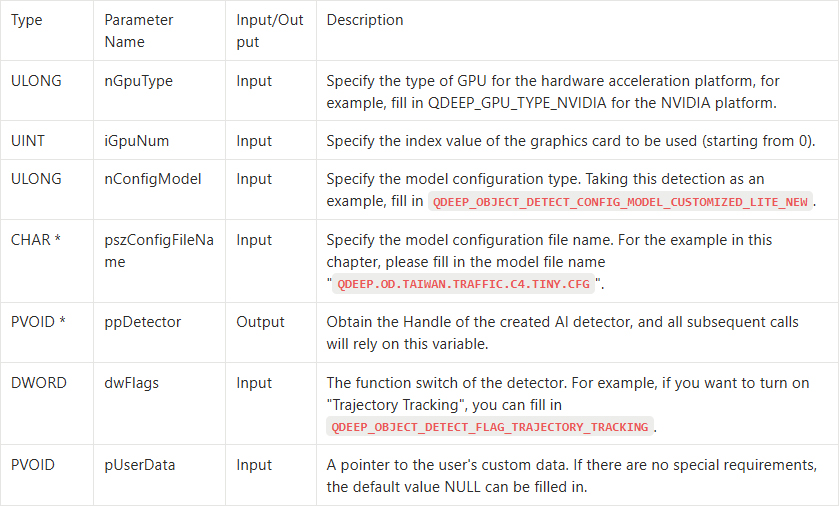
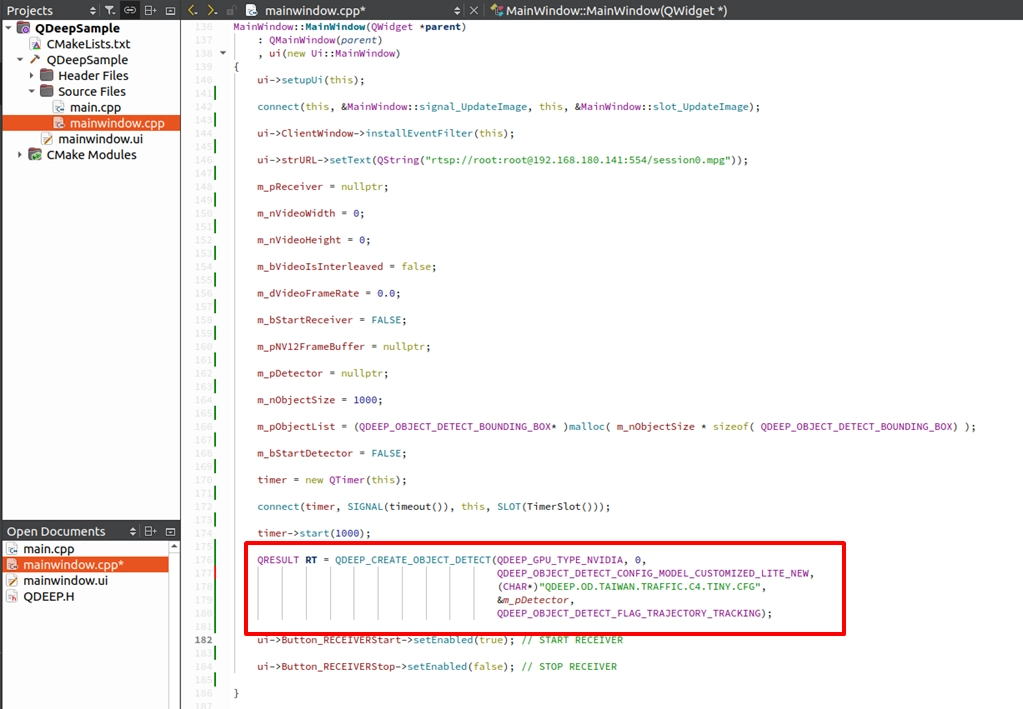
Just like the streamlined operation in the previous chapter, we only need to modify the model configuration file parameter ( pszConfigFileName ) in the QDEEP_CREATE_OBJECT_DETECT API to the new "QDEEP.OD.TAIWAN.TRAFFIC.C4.TINY.CFG". All other APIs for connecting, stopping, and feeding images require no changes!
QDEEP_CREATE_OBJECT_DETECT
This is the most critical API for creating the AI engine and loading the brain ( model ). The user must initialize the detector through this API.
QDEEP_OBJECT_DETECT_BOUNDING_BOX Struct
After swapping to the traffic-dedicated model, the nClassID ( class index ) returned by the AI engine through QDEEP_OBJECT_DETECT_BOUNDING_BOX will have a completely new physical meaning.
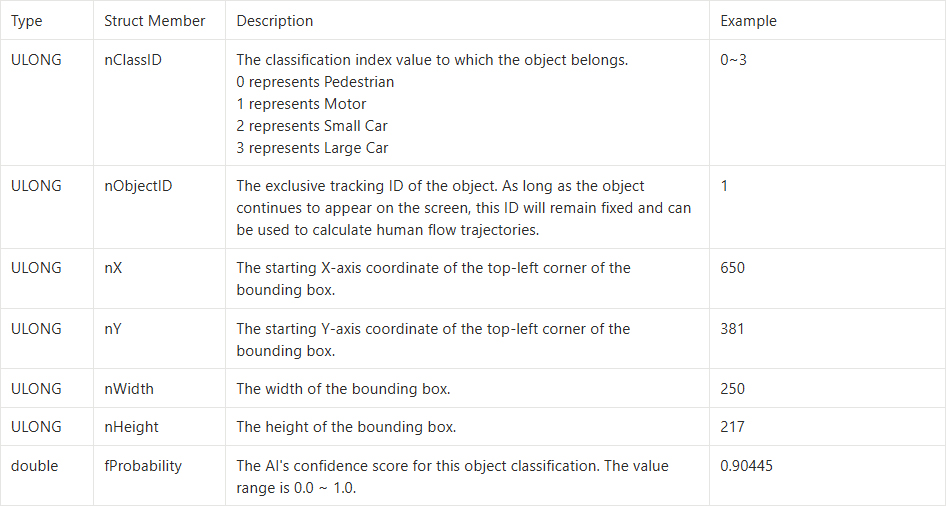
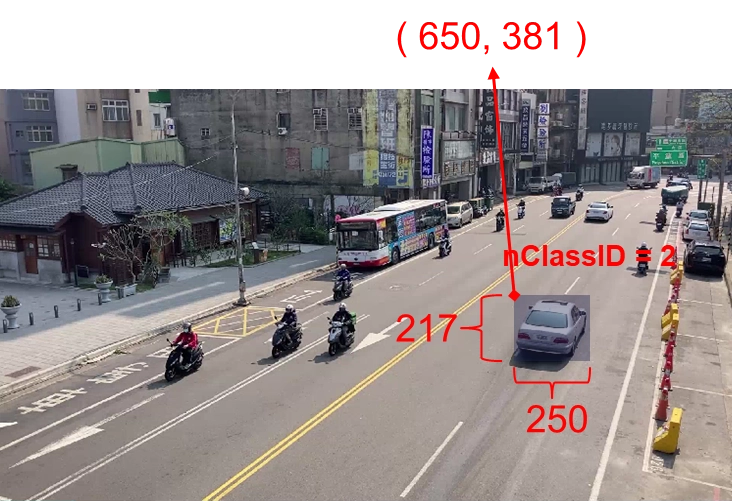
Understanding this definition, we can seamlessly modify the "labels and colors arrays" in the code!
Writing Core Code
Please open the project we completed in the previous chapter, and follow these two steps to modify it:
Modifying the Model Loading Name
Expanding the Class Names and Color Arrays
Final Verification
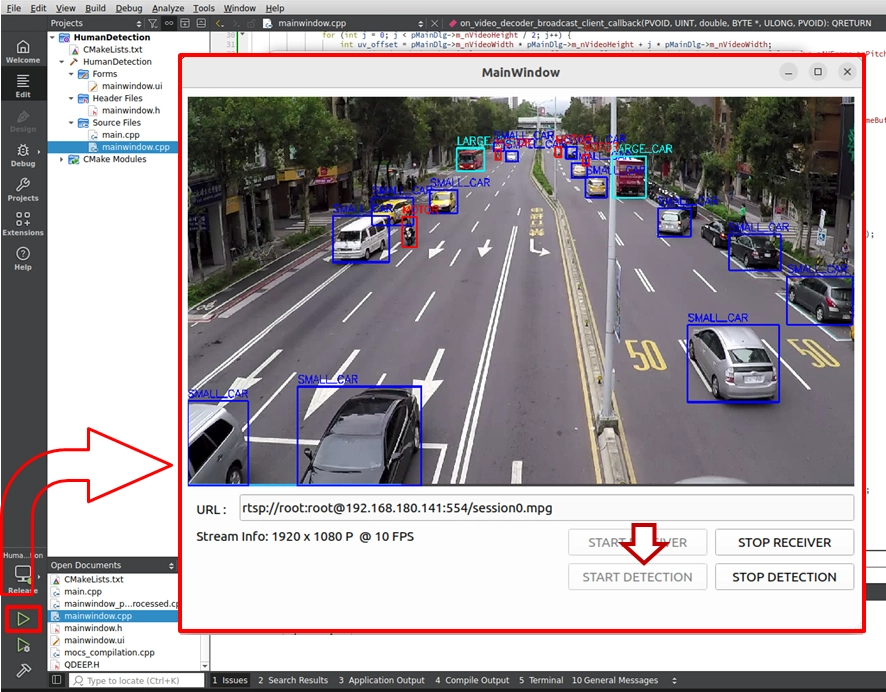
Get ready for a moment full of accomplishment! Now, please click "Build and RUN" in the bottom left corner to execute the project:
1. Enter a camera RTSP URL with a street view or road scene, and click START RECEIVER.
2. After the video is smooth, click START DETECTION to launch the AI traffic analysis engine.
➤ Warm Reminder ( Very Important ) : At the moment you open this software ( execute the program ) for the first time, the interface may take a moment to display. Please do not panic! This is because we wrote the logic for "loading the AI model" inside the program's constructor. The model must undergo initialization configuration during its first execution, at which point the system is working hard to load the massive neural network weight files into the GPU. As long as the software opens successfully ( first loading completed ), it means the AI brain is ready in the background! Subsequently, when you open the software again, you will no longer need this initialization waiting time!
➤ Test Results: When traffic and crowds on the road enter the frame, you will see:
• All weaving motorcycles ( Motor ) will be accurately drawn with red bounding boxes.
• Regular sedans ( Small Car ) on the road will be marked with blue boxes.
• Large vehicles like buses or trucks ( Large Car ) will be presented with cyan boxes.
From "Human Detection", "Multi-Object Features" all the way to "Smart Traffic Vehicle Recognition", you have personally experienced the amazing potential of the NexVDO SDK to cope with ever-changing scenarios using a single architecture. Hurry up and take this project to test the street view downstairs from your company!