6-5 Docker Interaction
Learning Objectives
Through this lesson, learners will master fundamental Docker container operations, including how to interactively enter containers, copy files between containers and the host, execute common management commands, configure container network modes and custom networks, apply data volumes for persistence, and set resource limits for containers. Learners will also understand key considerations and best practices when operating Docker containers, laying a solid foundation for advanced containerized application deployment and management
Basic Docker Container Interaction Tutorial
1. Run a container in detached mode”
docker run -d \
--name jetson_cpp_test \
-v /tmp:/tmp \
myapp \
sleep infinity
2. Entering a Container
Use the docker exec command to execute commands in a running container or enter an interactive shell:
# Enter the container’s interactive shell
docker exec -it
# Run a single command in the container
docker exec


3. Copying Files Between Container and Host
Use the docker cp command to copy files between the container and the host:
# Copy from host to container
docker cp /host/path
# Copy from container to host
docker cp


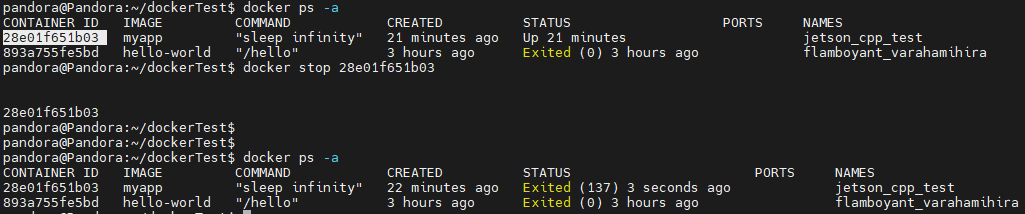
4. Common Container Management Commands
a. Start a container
docker start
b. Restart a container
docker stop
c. Restart a container
docker restart
d. View container logs
docker logs
e. Inspect detailed container info
docker inspect

5. Data Volume Management
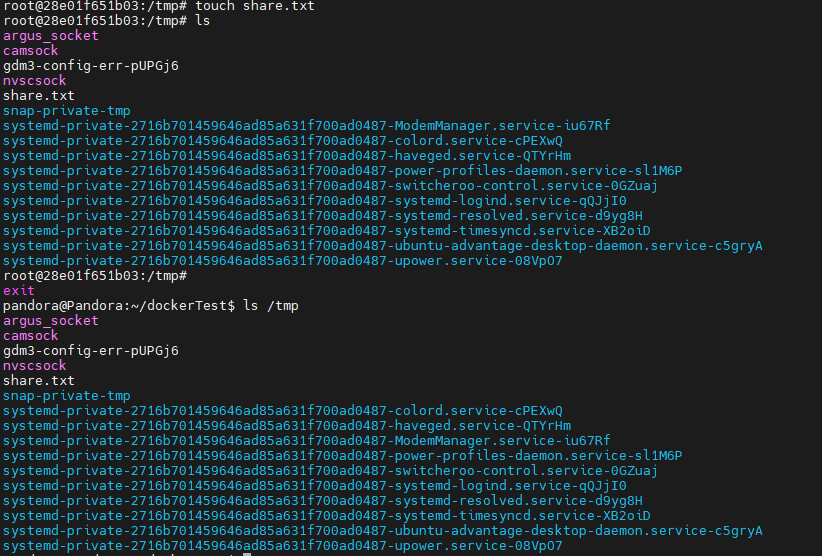
Use volumes for persistent data storage:
# Mount the volume when running a container
docker run -v
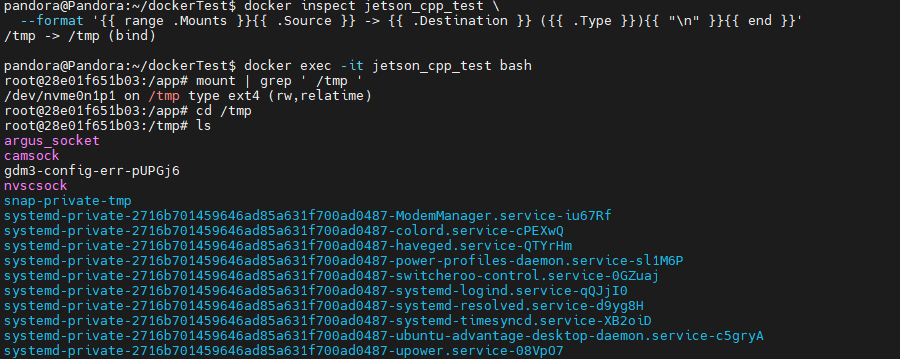
# Verify whether the mount
docker inspect jetson_cpp_test \
--format '{{ range .Mounts }}{{ .Source }} -> {{ .Destination }} ({{ .Type }}){{ "\n" }}{{ end }}'
# In container
mount | grep ' /tmp '
Best Practices and Notes
1. Be cautious when running commands after entering a container
2. Prefer volumes over storing important data directly in containers
3. Regularly back up important container data
4. Avoid exposing unnecessary ports to reduce security risks
These basic operations will help you better manage and use Docker containers. As you continue learning, you can explore more advanced features and best practices.