7-6 物体検出 ( Object Detection )
学習目標
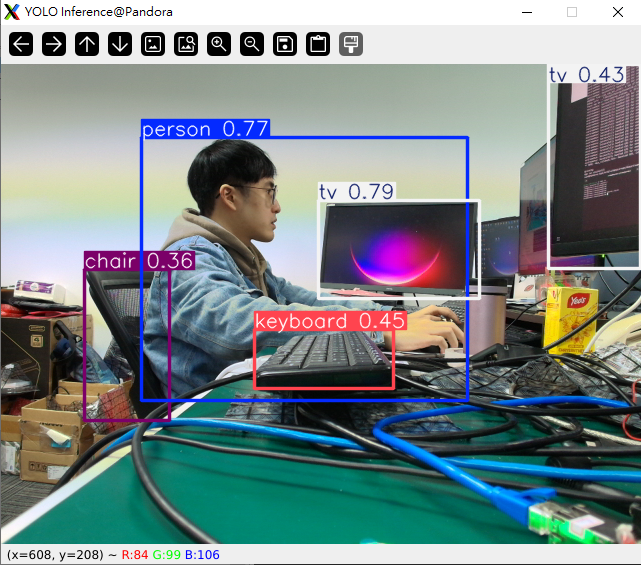
物体検出はコンピュータビジョンにおける重要なタスクです。その目的は、画像や動画の中にどのような物体が存在し、どこにあるのかをコンピュータが識別できるようにすることです。
物体検出システムは、単一の画像に対して以下の情報を出力します。
1. 物体のカテゴリ( 何 )
例:人、車、犬、カップ
2. 物体の位置( どこ )
通常はバウンディングボックスで表されます。
→ 物体を囲む長方形のボックス
3. 信頼度スコア( 信頼度 )
検出された物体が特定のカテゴリに属するというモデルの確信度を示します。
このコースでは、Pythonと事前学習済みの物体検出モデルであるYOLOを使用して物体を検出します。
画像内の物体を検出し、結果を出力する
from ultralytics import YOLO
model = YOLO("yolo11n.pt")
results = model.predict("https://ultralytics.com/images/bus.jpg")
for result in results:
print(f'xywh: {result.boxes.xywh}') # Center coordinates (x, y) and dimensions (w, h)
print(f'xyxy: {result.boxes.xyxy}') # Coordinates of the top-left and bottom-right corners (x1, y1, x2, y2)
print(f'names: {[result.names[cls.item()] for cls in result.boxes.cls.int()]}') # Class name of the detected object
print(f'confs: {result.boxes.conf}') # Confidence score of the detection
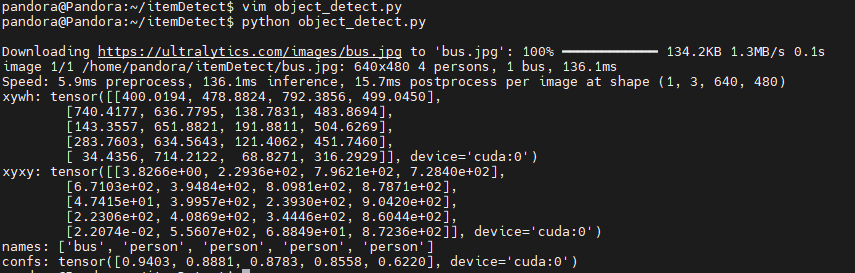
ターミナルに以下のコマンドを入力してください。
python object_detect.py
すると結果が表示されます。
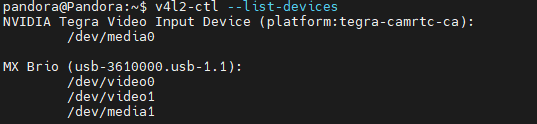
ウェブカメラを使用して物体検出を行い、結果を表示します。
まず、`v4l2-ctl --list-devices` コマンドを使用してウェブカメラを特定し、表示されたビデオデバイスの順序を確認してください。
import cv2
from ultralytics import YOLO
model = YOLO("yolo11n.pt")
# Set the order before video_path (example: video0 → set to 0).
video_path = 0
cap = cv2.VideoCapture(video_path)
while cap.isOpened():
success, frame = cap.read()
if success:
results = model.predict(frame)
annotated_frame = results[0].plot()
cv2.imshow("YOLO Inference", annotated_frame)
if cv2.waitKey(1) & 0xFF == ord("q"):
break
else:
break
cap.release()
cv2.destroyAllWindows()
すると、物体検出結果が表示されます。