7-9 Image Classification
Learning Objectives
Image Classification is one of the most fundamental and common tasks in computer vision. Its goal is to enable a computer to determine “which category an image belongs to.”
Given an input image, the output includes:
- The category the image belongs to
- Confidence scores for each category
We will use Python and a pre-trained model to perform image classification.
Perform image classification on a picture and print the Top-5 results.
import torch
from ultralytics import YOLO
model = YOLO("yolo11n-cls.pt")
results = model.predict("https://ultralytics.com/images/bus.jpg")
for result in results:
print(f'top 5: {[result.names[cls.item()] for cls in torch.topk(result.probs.data, 5)[1].detach().cpu().numpy()]}')
You will then obtain the results, which show the top 5 most likely categories.

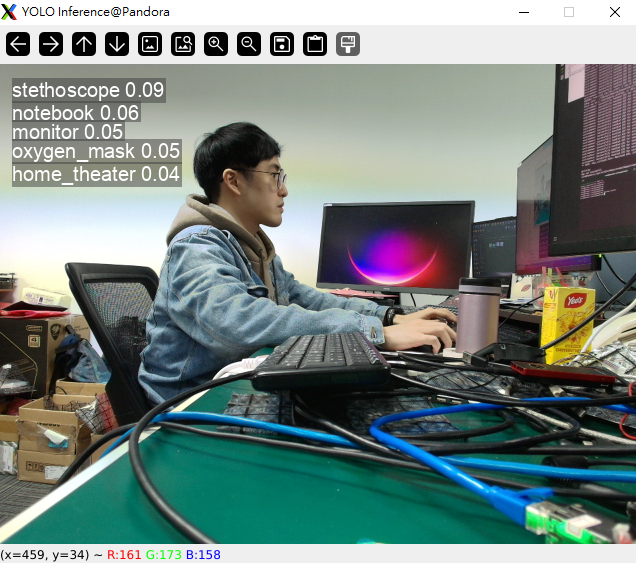
Perform real-time image classification using a webcam and visualize the results
import cv2
from ultralytics import YOLO
model = YOLO("yolo11n-cls.pt")
video_path = 0
cap = cv2.VideoCapture(video_path)
while cap.isOpened():
success, frame = cap.read()
if success:
results = model.predict(frame)
annotated_frame = results[0].plot()
cv2.imshow("YOLO Inference", annotated_frame)
if cv2.waitKey(1) & 0xFF == ord("q"):
break
else:
break
cap.release()
cv2.destroyAllWindows()
You will then obtain the results. The image displays the top 5 most likely categories, such as “stethoscope,” along with their corresponding scores, e.g., 0.09.